Getting started with CHERIoT-RTOS
- Michael Cobb
- Getting started guides
- January 23, 2026
As the number of small, internet connected devices grows, the security of these devices becomes increasingly important. Research published by Microsoft found that 70% of all CVEs they assigned arose from memory safety issues. This is a figure that has remained stable over the last decade. As smart devices begin to enter our homes and become a part of our every day lives, addressing this class of security vulnerabilities is a big step towards ensuring smart devices remain secure.
The CHERI architecture, developed jointly by University of Cambridge and SRI International, extends existing hardware Instruction Set Architectures (ISAs) - such as RISC-V - with new features designed to offer protection against memory access violations. The primary mechanisms being compartmentalisation and capabilities. Capabilities replace traditional pointers by extending them to include additional metadata such as bounds and access permissions, which are managed and enforced by the CHERI hardware; any attempts to directly manipulate a capabilities metadata from software (for example to increase bounds or elevate permissions) will render the capability invalid. With hardware enforced checks on all pointer accesses, historically unsafe C/C++ code can be executed with memory safety guaranteed by the hardware. Existing C/C++ code can often be ported to CHERI with little to no modification necessary.
The CHERIoT project aims to provide a full hardware and software platform suitable for Internet of Things (IoT) embedded devices. Such devices are typically resource constrained with only a few hundred kilobytes of RAM and lack a Memory Management Unit (MMU) that provides process isolation. The CHERIoT Instruction Set Architecture (ISA) is designed for tiny cores, without depending on the presence of an MMU to handle memory isolation. At the microcontroller scale, the overheads associated with MMUs becomes far too great - the size of a page table entry that would be needed to isolate an object in memory would itself far exceed the size of the object itself. A more in-depth description of the CHERIoT implementation vs the more general idea of CHERI can be found here.
CHERIoT introduces compartments (built upon hardware capabilities) as an isolation mechanism that are similar in functionality to shared libraries, while also providing memory isolation much like a traditional operating system process. A compartment may contain code along with mutable global state that is protected by a hardware-enforced boundary. Interoperation between two compartments happens via explicitly exported functions, which are exposed to external code via sealed capabilities. This allows for an exported function to be called from another compartment, whilst preventing any external access to internal private data. It is worth noting that CHERIoT compartments differ from conventional process isolation in the sense that compartments do not own a thread - threads are independent and may call code from multiple compartments.
This model allows for fine-grained isolation between software components in much the same way that a traditional MMU would provide protection between processes, while avoiding the additional associated overheads such as maintaining per-process address spaces through pages tables and performing context switches. Compartments enable least-privilege separation between software components at function and object level, in contrast to a traditional embedded system where all code typically runs in a single, privileged address space.
We recommend checking out Chapter 5 of the CHERIoT Programmers Guide for a more technical overview of how compartments and libraries are used in CHERIoT.
The full CHERIoT hardware/software “stack” consists of three major components:
- The CHERIoT ISA (Instruction Set Architecture), which extends the RISC-V ISA with a core CHERI implementation suitable for small-scale embedded devices.
- CHERIoT-LLVM, the compiler toolchain targeting CHERIoT.
- CHERIoT-RTOS, the real-time operating system implementation designed for use with the CHERIoT architecture.
CHERIoT-RTOS constitutes the core RTOS components of the wider CHERIoT platform, which also includes the CHERIoT Sail ISA specification from which we will build an emulator that is able to run our CHERIoT-RTOS applications. As such, this is a project that encompasses both hardware and software, where hardware vendors can manufacture hardware which implements the CHERIoT ISA, and software written using the CHERIoT-RTOS stack can take advantage of the capability features provided in hardware.
The CHERIoT project was initially developed by Microsoft, but has since been made open-source to improve collaboration with the wider community. The project is currently is in active development - recently awarded funding from UKRI is supporting efforts to improve CHERIoT’s support for Rust. As is always the case with projects in early development, breakages and issues are to be expected, so using CHERIoT-RTOS in production is not yet recommended.
In this post, we will walk through how to build and run the CHERIoT-RTOS toolchain, emulator, tests, and example applications from source. The CHERIoT project is very well documented: there’s a very handy Getting Started guide which you may find helpful to read alongside this post, and also a Programmers’ Guide which explains the core concepts of CHERIoT in detail.
Using devcontainer
CHERIoT-RTOS provides a development environment container which includes all of the necessary dependencies pre-built to allow you to quickly begin development of CHERIoT-RTOS applications, without the need to build LLVM and the Sail-based emulator first. If you’re looking to quickly get started developing with CHERIoT-RTOS, we recommend using the devcontainer. For instructions on setting up and using the devcontainer, please see the Getting Started guide here.
If you are using the devcontainer, you can skip ahead to Building and running CHERIoT-RTOS test suite and examples where we compile and run both the CHERIoT-RTOS test suite and example “Hello World” application.
If you’d like to learn how to build CHERIoT-LLVM and the Sail emulator for CHERIoT-RTOS from source, continue reading.
Building from source
To build (and run) CHERIoT-RTOS applications, we will first need to build the two dependencies: CHERIoT-LLVM RISC-V compiler toolchain and the CHERIoT-Sail RISC-V emulator.
The steps below have been tested on Ubuntu 24.04.
For reference, here’s the full list of repositories (and commit hashes) used:
| Project | Branch Name | Commit Hash |
|---|---|---|
| CHERIoT-LLVM (Based on upstream LLVM 21.1.8) | cheriot | f847c79 |
| CHERIoT-Sail | main | 1ce0023 |
| CHERIoT-RTOS | main | f7be545 |
Building CHERIoT-LLVM
First we will build CHERIoT-LLVM, which will provide us with the CHERI-enabled compiler toolchain we will need to compile CHERIoT-RTOS applications.
Install dependencies
To build CHERIoT-LLVM, we will first need to install
ninja-buildandcmake. On an Ubuntu system, these packages can be installed by running:$ sudo apt install ninja-build cmakeCloning CHERIoT-LLVM
Clone the CHERIoT-LLVM repo, and checkout the
cheriotbranch. We also need to setLLVM_PATHin our environment to point to the directory where we just checked out CHERIoT-LLVM.$ git clone --depth 1 https://github.com/CHERIoT-Platform/llvm-project cheriot-llvm $ cd cheriot-llvm $ git checkout cheriot $ export LLVM_PATH=$(pwd)Create the build output directory and run CMake to configure the build:
Take note of the build directory (in this case,
builds/cheriot-llvm), as this directory is where our compiled toolchain will be placed, and we will need to tell CHERIoT-RTOS where to find it when we compile our CHERIoT-RTOS programs.$ mkdir -p builds/cheriot-llvm $ cd builds/cheriot-llvm $ cmake ${LLVM_PATH}/llvm -DCMAKE_BUILD_TYPE=Release -DLLVM_ENABLE_PROJECTS="clang;clang-tools-extra;lld" -DCMAKE_INSTALL_PREFIX=install -DLLVM_ENABLE_UNWIND_TABLES=NO -DLLVM_TARGETS_TO_BUILD=RISCV -DLLVM_DISTRIBUTION_COMPONENTS="clang;clangd;lld;llvm-objdump;llvm-objcopy" -G NinjaStart the build:
$ export NINJA_STATUS='%p [%f:%s/%t] %o/s, %es'
$ ninja install-distribution
Building LLVM will take several minutes, and requires a system with a large amount of RAM. If your system does not have enough RAM, you may see the build gets killed unexpectedly.
Once this step is complete, you should be able to find toolchain executables under builds/cheriot-llvm/bin.
We’ll need to provide this directory to CHERIoT-RTOS when we build the test suite and example applications later.
Building CHERIoT-Sail (Emulator)
CHERIoT-Sail is an emulator that we can use to run our CHERIoT-RTOS programs on our host machine. The emulator is generated from the formal specification of the CHERIoT ISA, using a project called Sail.
Install dependencies
We’ll first need to install
opam,z3,libgmpandcvc4before we can build CHERIoT-Sail. On an Ubuntu system, these dependencies can be installed by running:$ sudo apt install opam z3 libgmp-dev cvc4Install Sail with
opam:$ opam init --yes $ opam install --yes sailClone the CHERIoT-Sail repo, and make sure you are on the
mainbranch:$ git clone --depth=1 --recurse-submodules https://github.com/CHERIoT-Platform/cheriot-sail $ cd cheriot-sail $ git checkout mainStart the build:
Note: If your machine has GCC version >= 15, the code generated by Sail will not compile.
This is due to the fact that newer versions of GCC default to the C23 standard and the code generated by Sail is not compatible with this version of the C standard.
You can work around this issue by using an older version of GCC, or by modifying the CHERIoT-Sail Makefile and adding
-std=gnu18toC_FLAGS. This will tell GCC to compile using the older C17 standard instead, which is the default in versions of GCC < 15.First make sure that your environment is set up with
opam, then runmake csimto build the emulator.$ eval $(opam env) $ make csim
Building and running CHERIoT-RTOS test suite and examples
To build and run the CHERIoT test suite and examples, you’ll need a suitable CHERI-enabled toolchain in order to compile CHERIoT-RTOS code, If you’ve followed the steps above, you should have just built this. You can also use the devcontainer which includes a pre-built toolchain.
Additionally, if you don’t have access to compatible CHERI hardware, you can use the CHERIoT-Sail emulator to run CHERIoT-RTOS applications on your host machine.
Building CHERIoT-RTOS test suite and examples
Install the dependencies.
If you are using the devcontainer,
xmakeshould already be installed.The examples provided by CHERIoT-RTOS are built using
xmake. This can be installed on Ubuntu using the PPAxmake-io/xmake. On Ubuntu we can run:$ sudo add-apt-repository ppa:xmake-io/xmake $ sudo apt install xmakeClone the CHERIoT-RTOS repo, and make sure you are on the
mainbranch:$ git clone --depth=1 --recurse-submodules https://github.com/CHERIoT-Platform/cheriot-rtos $ cd cheriot-rtos $ git checkout mainBuild the test suite using xmake:
Configure the project using xmake. Make sure to pass
--sdk=<toolchain path>(where<toolchain path>is the path to the CHERIoT-LLVM toolchain).If you’ve built the CHERIoT-LLVM toolchain yourself, as explained above, you should pass the directory to the build folder. If you exported
LLVM_PATHto your environment, the toolchain SDK should be found under${LLVM_PATH}/builds/cheriot-llvm. Alternatively, if you are using the devcontainer, the toolchain SDK can be found under/cheriot-tools/.Be sure to pass the correct location to the CHERIoT-LLVM toolchain as found on your system.
We can configure the build with:
$ cd tests
$ xmake config --sdk=<toolchain path>
And then build the test suite by running
xmake. Pay attention to the line starting with “linking firmware” - this will show you the location of the firmware executable that we will run inside the emulator:$ xmake <...> [ 94%]: linking firmware build/cheriot/cheriot/release/test-suite <...>Once built, you should be able to find the firmware executable file under the
build/cheriot/cheriot/releasedirectory:$ ls -la build/cheriot/cheriot/release <...> -rwxr-xr-x 1 ubuntu ubuntu 3538568 Dec 15 15:33 test-suite <...>Additionally, there are more examples under the
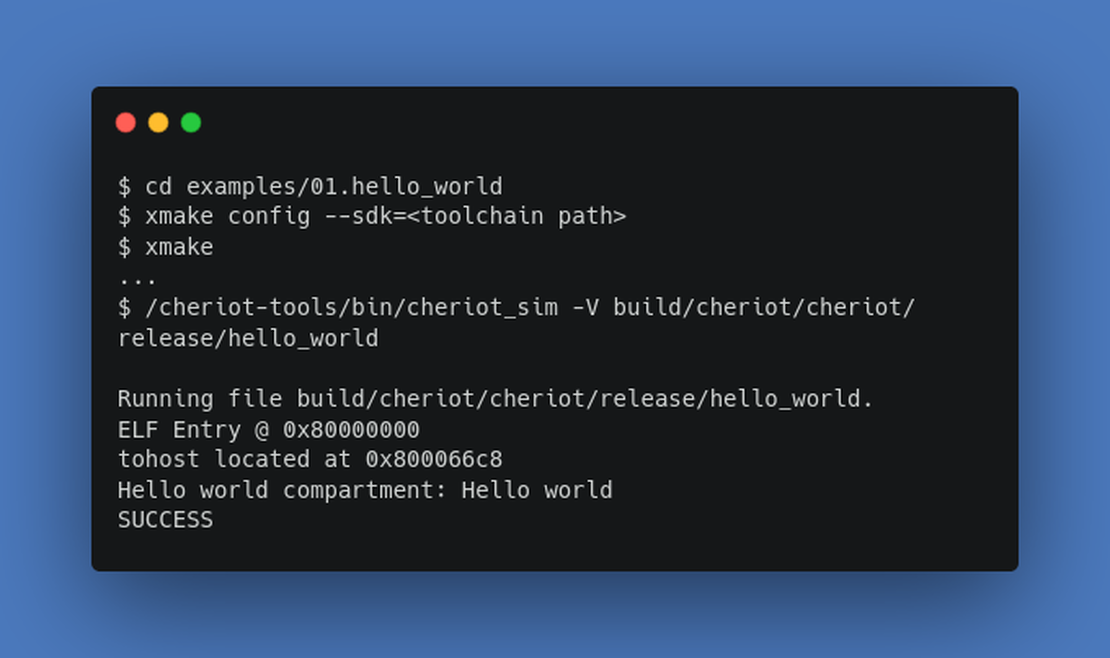
examples/subdirectory. Each example can each be built usingxmakein the same manner as above, For example, the “Hello World” example can be built by running:$ cd examples/01.hello_world $ xmake config --sdk=<toolchain path> $ xmake
Running the test suite and examples using the C emulator
You can run the test suite using the emulator (provided by CHERIoT-Sail). Provide the emulator with the path to the firmware executable.
We pass the -V flag to disable tracing of instructions to make it easier to see output from the application. You can omit this flag if you also want to see this information.
When using the devcontainer, the emulator is located in /cheriot-tools/bin/cheriot_sim, or when built manually, under <path to cheriot-sail repo>/c_emulator/cheriot_sim.
Once we have built the test suite, we can run it in the emulator:
tests$ /cheriot-tools/bin/cheriot_sim -V build/cheriot/cheriot/release/test-suite
Running file build/cheriot/cheriot/release/test-suite.
ELF Entry @ 0x80000000
tohost located at 0x80027c88
<...>
Test runner: Allocator finished in 5507861 cycles
Test runner: All tests finished in 6560564 cycles
SUCCESS
The test suite should take a few moments to run, once it has finished, you should see “SUCCESS” printed on the final line.
Assuming you have built the “Hello World” example, similarly we can run it like so:
examples/01.hello_world$ /cheriot-tools/bin/cheriot_sim -V build/cheriot/cheriot/release/hello_world
Running file build/cheriot/cheriot/release/hello_world.
ELF Entry @ 0x80000000
tohost located at 0x800066c8
Hello world compartment: Hello world
SUCCESS
You should now have everything you need in order to go ahead and begin working on your own CHERIoT projects! A good starting point might be to run some of the more advanced examples included in the examples/ directory.
CHERIoT has lots of documentation available, both on the Github repo and on the main website. Looking forwards, the effort to bring full Rust support into CHERIoT platform will further increase CHERIoT’s viability for embedded projects - allowing existing embedded Rust code to be ported to CHERIoT. We also hope that improvements to the toolchain will allow for unification of the CHERIoT-LLVM fork with the existing CHERI LLVM.
Improving the Status Quo
Currently the CHERIoT project, while very well documented, does not appear to be producing versioned releases of CHERIoT-RTOS. As the community grows and new software and libraries will be written to target CHERIoT-RTOS, a clear versioning scheme will need to be considered to ensure that others will be able to target their projects against a known CHERIoT-RTOS version. It is worth noting that development of CHERIoT-RTOS is currently progressing towards a “1.0” initial release, so we expect to see CHERIoT-RTOS follow a stricter release versioning scheme after this initial release.
As work towards a stable “1.0” release of the CHERIoT-RTOS project continues, the addition of Rust support within CHERIoT will likely bring a big boost to the project. Rust support will allow the integration of existing Rust-based IoT code into the CHERIoT ecosystem. However, availability of CHERI hardware continues to be a major blocker towards real world adoption of CHERI in IoT projects. Since the CHERIoT ISA was finalised recently, SCI have produced their first run of ICENI family devices which includes a CHERIoT IBEX RISC-V core. We can now expect other silicon vendors to begin producing hardware supporting the CHERIoT ISA in the near future. Until such hardware becomes available, the CHERIoT architecture can be implemented on FPGA hardware, with official support for the Arty A7 and Sonata FPGA boards.